


Solitaire
4.2177.00 Reviews
App Specs
- Version
- 2.2.300
- Updated On
- License
- Free
- Downloads
- 5,000,000+
- Developer
- Never Old PTE. LTD.
- Categories
- Card
- Platform
- Android, iOS
Screenshots
 Analysis by AppCompare
Hey there! So, I recently decided to dip my toes into the world of mobile card games and stumbled upon a classic gem, Solitaire. If you're anything like me, you've probably spent countless hours playing this timeless card game on your computer back in the day. Well, let me tell you, the mobile version is just as addictive and a perfect way to kill time when you're waiting for your coffee or just chilling at home.
When a quick game gets interrupted
The simple appeal is also where I think about the practical side. Solitaire works best for me when I can give a hand a little attention without expecting a long, uninterrupted session. A queue, a quiet break, or a few minutes at home can suit the format. If I need to stop midway, I treat the game as something to return to only if its current state is still available; I avoid assuming that every interruption will be saved exactly as I left it.
For a smoother first session, I start with the familiar rules rather than trying to learn several variants at once. That makes it easier to tell whether I am stuck because I missed a move or because I am still getting used to the layout. On a small screen, I also slow down before moving a card: a deliberate tap or drag is less frustrating than rushing and then having to work out what changed.
One useful habit is to pause before using a hint. I first scan the columns and the available cards for a move that opens a face-down card or creates room for a useful sequence. If I still cannot see a sensible option, a hint can help me notice a possibility, but I would not treat it as a guarantee that a move is strategically best. This keeps the game relaxing while still letting me practise spotting patterns.
The Nostalgic Experience
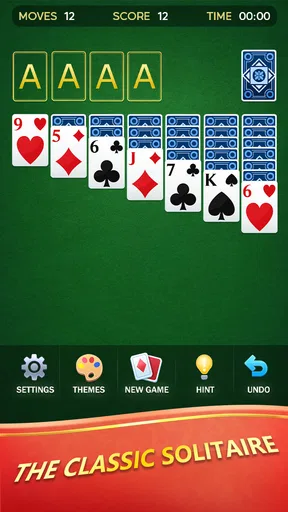
Alright, let's dive right into the good stuff. The first thing that struck me about Solitaire is how faithful it is to the original game. The design is simple, clean, and reminiscent of the early days of Windows, but with a modern twist. It's like meeting an old friend who got a stylish makeover.
Playing is as straightforward as you remember: you deal out the cards, stack them in alternating colors, and aim to build each suit from Ace to King. The app offers several variations, including the classic Klondike, Spider, and FreeCell. Personally, I love switching things up, so having these options keeps things fresh and engaging.
Choosing a mode for the moment
Those familiar variations serve different moods. I lean toward Klondike when I want a quick, recognizable round; Spider suits me better when I want to focus on longer sequences; and FreeCell is a better fit when I want to think carefully about where each card can go. That is a practical reason to switch modes, rather than simply choosing a new one because it is available. If you are new to card games, beginning with one ruleset also avoids turning a short break into a tutorial session.
Worth Reading Before You Choose

EA SPORTS FC Mobile 26 Is a Bigger Football Game, but It Takes Time

Flipboard Shows What News Apps Must Do Beyond the Feed

Switching to Android Auto Means Rethinking Your Driving Routine

Google Calendar Makes a Crowded Week Easier to Manage

Ludo King Makes the Most of the Minutes Between Plans

Baby Panda World Brings Quick Play to Modern Phones, but Its Game Library Feels Busy
Compared with a basic single-mode Solitaire game, having several well-known formats in one place can save the hassle of choosing and installing separate apps. The trade-off is that anyone who wants a deep, specialized experience in just one variant may prefer an app built around that specific mode. I would choose this one for convenient variety, not because variety automatically means every mode will suit every player equally.
Features That Stand Out
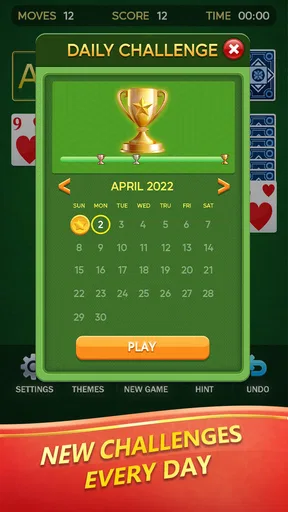
One of the features that really caught my attention is the daily challenges. Each day, you get a new puzzle to solve, and completing it earns you a reward. It's a fun way to keep the game exciting and motivate you to log in daily. Plus, there's something immensely satisfying about checking off that daily challenge, am I right?
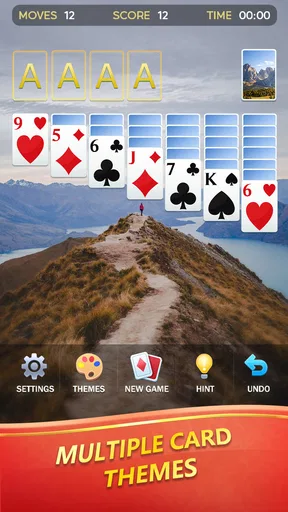
I also appreciate the customization options. You can choose from a variety of card designs and backgrounds to suit your mood. Feeling fancy? Go for a royal theme. Want something more laid-back? Opt for a beach scene. It's a small touch, but it adds a lot to the overall experience.
A routine that stays manageable
Daily challenges are most useful when they add a little structure without becoming an obligation. I would fit one into a regular pause—perhaps while waiting for a drink—rather than plan my day around returning to the game. If a challenge feels difficult, switching back to a familiar mode is a sensible way to keep the app enjoyable instead of turning a casual card game into a chore.
Customization is similarly practical: a clear contrast between the cards and the background matters more to me during play than picking a theme simply because it looks decorative. If a chosen design makes suits or card ranks harder to distinguish at a glance, I would change it. This is a small adjustment, but it can reduce mistakes, especially when playing on a phone in bright surroundings or while glancing at the screen between other tasks.
Gameplay and Mechanics
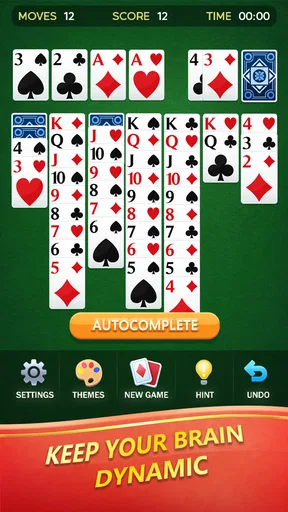
The mechanics are smooth and intuitive, which is crucial for a game like this. You drag and drop cards with ease, and the app is responsive without any lag. There's also an undo button, which, let's be honest, is a lifesaver when you make a silly mistake. No more frustration over accidentally moving the wrong card!
Another cool feature is the hint system. If you ever find yourself stuck, just tap the hint button, and it will nudge you in the right direction. It's perfect for those moments when you're scratching your head and can't see the next move.
Recovering from a confusing move
When a move does not seem to have worked as intended, I check the board before tapping repeatedly. A card may have moved to a different pile than I expected, or I may have overlooked a newly available option. Undo is useful for reversing an accidental move, but I use it selectively: if I am exploring a sequence, reversing one step at a time helps me understand where the plan stopped working instead of simply erasing a whole chain of decisions.
If the game feels awkward to control, I first try making one move slowly and clearly, then check whether the screen responds as expected. If a brief interruption or a device issue has disturbed my session, I reopen the game and see what state it presents rather than assuming the problem came from a particular move. Those checks are simple, but they help separate a card-game mistake from a temporary distraction or touch-screen misread.
Setup checks before blaming the game
Solitaire is a free card game from Never Old PTE. LTD., and it is rated for Everyone. It has an average rating of 4.2 from around 5.2 thousand ratings, with over 5 million installs. The release date is June 27, 2021; the current version is 2.2.300, and Android 6.0 or later is required. I would check that my device meets that minimum before troubleshooting installation or launch problems, and make sure I am using the current version available to me.
If it will not install or open, I start with ordinary checks: confirm that the device has a working connection when one is needed for the store, check available storage, and try reopening the store or the app. I also make sure I have not mistaken a slow response for a failed card move. These are general first steps, not a promise that every issue has the same cause. If the trouble continues, restarting the device and checking for an available app update are reasonable next moves.
Who will enjoy it—and who may prefer something else
I think this is a good fit for someone who wants recognizable card play, a choice of familiar variants, and a low-pressure way to fill small gaps in the day. It can also suit a returning player who remembers Solitaire but wants to ease back in without committing to a competitive or complicated game. The mix of modes makes it easier to adjust the kind of thinking a session asks for, while the familiar rules keep the basic learning curve approachable.
I would steer away from it if you are looking for a story, social competition, or a game that constantly changes its central mechanics. This is still Solitaire: the pleasure comes from reading the cards, planning moves, and enjoying a satisfying finish, not from a narrative or a fast-changing challenge. Someone who dislikes repeated rounds of card sorting may find the familiar rhythm monotonous, even with multiple variants and daily challenges.
For a realistic everyday use, I would open it during a short wait, play a few moves at an unhurried pace, and put it aside when the next task arrives. I would not start a longer or more demanding round if I knew I had only a moment and would be annoyed by interruption. That small choice makes the game a better companion for spare time than a substitute for an activity that needs full attention.
Why Solitaire is a Must-Try
Now, I know some of you might be thinking, "Isn't Solitaire a bit old school?" Well, yes, but that's the beauty of it. It's a classic for a reason. The game is timeless, easy to pick up, and provides a great mental workout. Plus, playing on mobile means you can enjoy it anytime, anywhere.
Whether you're a seasoned Solitaire pro or a newcomer, this app has something for everyone. It brings back those nostalgic vibes while offering enough variety and challenges to keep things interesting. And let's not forget, it's a great way to unwind after a long day.
So, if you haven't already, give Solitaire a try. It's like a comforting cup of tea on a rainy day—simple, familiar, and always satisfying. Happy playing!
Pros
- Simple and intuitive interface.
- No internet connection needed.
- Customizable card designs.
- Quick and responsive gameplay.
- Suitable for all ages.
Cons
- Ads can be intrusive.
- Limited game modes.
- No multiplayer options.
- Lacks advanced features.
- Basic graphics and animations.
FAQs for Solitaire
What are the main features of the Solitaire app?
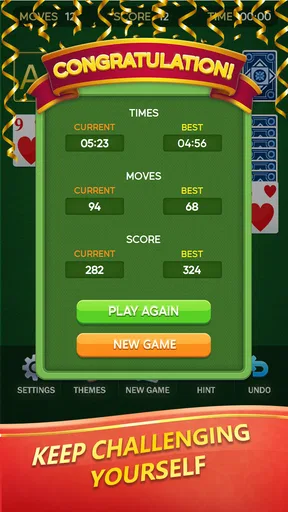
The Solitaire app offers classic gameplay with a modern twist, featuring customizable themes, daily challenges, and detailed statistics tracking. It includes different modes like Klondike, Spider, and FreeCell, ensuring diverse gameplay. The app also supports offline play, allowing you to enjoy Solitaire anytime, anywhere without needing an internet connection.
Is Solitaire available for both Android and iOS devices?
Yes, the Solitaire app is available for both Android and iOS platforms. It can be downloaded from the Google Play Store for Android devices and the Apple App Store for iOS devices. This makes it accessible to a wide range of smartphone users, ensuring everyone can enjoy the classic card game.
Does the Solitaire app require an internet connection to play?
No, the Solitaire app does not require an internet connection for the main gameplay. You can enjoy the classic card game offline. However, some features like daily challenges and leaderboards may need an internet connection to update and sync your progress with other players.
Are there any in-app purchases or ads in the Solitaire app?
The Solitaire app is free to download and play, but it may include in-app purchases to remove ads or unlock premium features. While ads might appear during gameplay, they are usually non-intrusive. In-app purchases are optional and designed to enhance the gaming experience without affecting the core gameplay.
Is the Solitaire app suitable for all age groups?
Yes, the Solitaire app is suitable for players of all ages. Its simple rules and easy-to-understand gameplay make it accessible for both children and adults. The app provides a relaxing and engaging experience, offering a perfect way to unwind and improve strategic thinking skills.


